How to check App Store keyword popularity (and what the score means)
Updated
TL;DR: Type the keyword into a free popularity checker or look at the 1–5 dots in Apple Ads keyword recommendations. Read the number as a ranking against other keywords in the same store, not as a search count. A new app should usually target keywords around 20–40 where it can realistically reach the top 10, and treat a score of 5 as "not measured", not "no searches".
App Store keyword popularity is a 5–100 score that shows how often a term is searched relative to other terms in one storefront. It is based on Apple Search Ads data, and Apple does not publish actual search counts. Higher is more searched, and the scale isn't linear, so a 60 is not just twice a 30. Always read popularity next to difficulty: a popular keyword you can't rank for sends you nothing.
This guide shows the two ways to check the score, what each range means in practice, and real numbers from the US store so you can calibrate.
How to check keyword popularity
Option 1: free, in a browser
- Open the keyword popularity checker. No account needed.
- Pick the store. Popularity is measured per country, so choose the storefront you're optimizing for.
- Enter the keyword exactly as people would type it. "to do list" and "todo list" are different keywords with very different scores (more on that below).
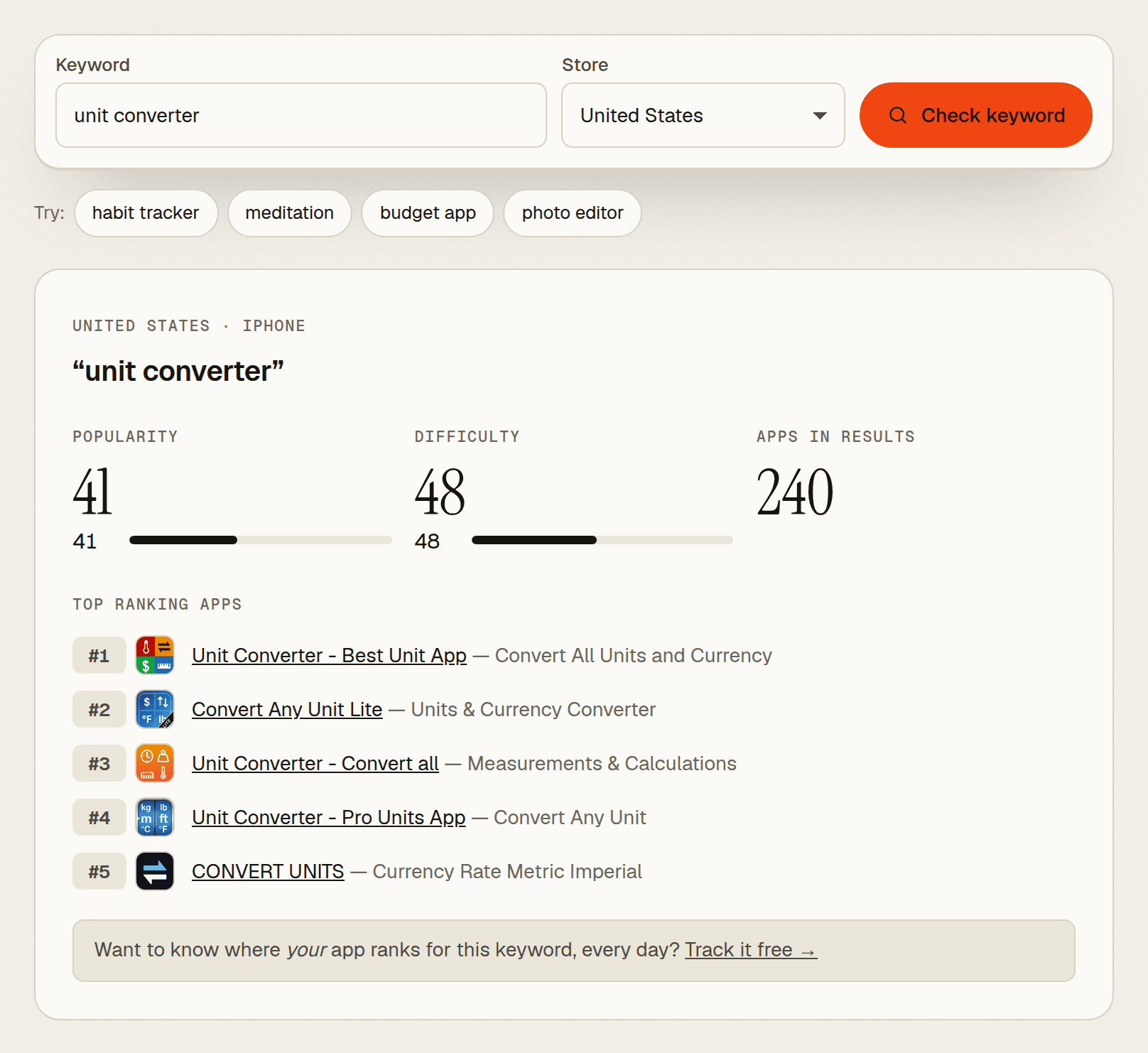
- Read three things: popularity, difficulty, and the apps ranking at the top right now.
You get the result in a few seconds. The free checker allows 10 checks a day on iPhone results.
Option 2: in Apple Ads
- Sign in to Apple Ads (you need an Apple Ads account).
- Open keyword recommendations for a Search Results campaign.
- Read the Search Popularity column. Apple shows it as 1 to 5 dots, with 5 being the most popular (Apple Ads best practices).
Both come from Apple Search Ads data. Apple doesn't document how the dots map to the 5–100 number tools show, but the dots most likely group the same scores into five steps. The dots are fine for a quick look. The number is better when you're choosing between ten similar phrases.
What the popularity score means
Popularity is a relative index, not search volume. It tells you which of two keywords people search more often in a given store. It does not tell you how many searches either one gets. Three things to keep in mind:
- It isn't linear. The gap between 50 and 60 is much bigger than the gap between 20 and 30. Don't average scores or add them up.
- It's per storefront. "unit converter" scores 41 in the US and 31 in Germany. A German phrase like "einheitenumrechner" reads 5. Check every store you localize for, with the words people there actually use.
- It moves. Seasonal terms rise and fall. Recheck before you change metadata.
Popularity says nothing about whether you can rank or whether searchers would download your app. Apple ranks search results on text relevance (your name, subtitle, keywords and category) and user behavior like downloads and ratings (Apple: App Store search). Popularity just tells you how big the prize is.
What a score of 5 means
5 is the floor, not zero. It's the lowest value the score can show, and since late 2025 it's what most long-tail keywords display.
Around October 1, 2025, Apple's popularity data changed: most keywords that used to score 20–60 started reading 5. ASO.dev counted US keywords above 5 dropping from 165,875 to under 40,000 in about a week (ASO.dev analysis), and other tools reported the same (MobileAction statement). Apple hasn't explained it.
So a 5 can mean "a few searches a month" or "steady niche demand". The score alone can't tell. "habit tracker" reads 67; "habit tracker widget" reads 5, and that 5 can't tell you whether the longer phrase gets a handful of searches or a steady stream. When a keyword reads 5, decide with signals that still vary:
- Autocomplete. Type the phrase into App Store search on your phone. If Apple suggests it, people search it.
- Who ranks. If the top apps for the phrase look like yours, the intent matches. Check with the rank checker.
- What competitors target. The competitor keyword finder pulls searched terms from the names and subtitles of the top 10 apps.
A 5 is a fine choice for a spare slot in your keyword field. It's a poor choice for your app name.
What popularity score should you target?
For a new or small app: 20–40, with difficulty you can beat. That range has real demand, and the top results are less likely to be locked by apps with hundreds of thousands of ratings. The point is to reach the top 10. Rank 60 for a popular term sends almost nobody.
| Popularity | What it means | What to do |
|---|---|---|
| 5 | Below what Apple reports | Validate with autocomplete and who ranks. Good for keyword-field filler and long-tail phrases. |
| 6–19 | Low but measured demand | Worth it if the phrase describes your app exactly. Easy wins add up. |
| 20–40 | Solid niche demand | The main target for new apps, if difficulty is moderate and small apps appear in the top 10. |
| 40–60 | Popular | Worth chasing once you have ratings, or for a very exact match in your name. |
| 60+ | Head terms | Usually owned by big apps. Use the word inside a longer phrase instead of targeting it alone. |
Scale up as your app grows. Once you're in the top 10 for a few 20–40 terms and ratings are coming in, try the 40–60 terms in the same theme.
Real examples
Numbers from the US App Store, iPhone, checked October 25, 2026.
| Keyword | Popularity | Difficulty | Ratings of the #1 app |
|---|---|---|---|
| habit tracker | 67 | 71 | 148,243 |
| water reminder | 49 | 71 | 79,059 |
| unit converter | 41 | 48 | 198,542 |
| drum machine | 33 | 65 | 1,133 |
| todo list | 23 | 78 | 48,583 |
What these show:
- "habit tracker" and "water reminder" are crowded. Both have difficulty 71 and established apps on top. A new habit app should aim for phrases built around a specific angle instead.
- "unit converter" looks easier on paper than it is. Difficulty 48 is the lowest here, but the #1 app has almost 200,000 ratings. Always look at the actual results, not only the score.
- "drum machine" is the opposite. Difficulty is high (65), yet the #1 app has about 1,100 ratings. A focused app with a precise name has a real shot.
- "todo list" scores 23 while "to do list" scores 66. Same meaning, different spelling, nearly 3x the score. Check every variant before you commit.
More variant pairs from the same check: "recipe" 57 vs "recipe app" 7, and "qr code reader" 64 vs "qr code scanner" 25. Adding "app" or swapping a synonym can move the score a lot.
Popularity vs difficulty
Read them together. Popularity is how many people search; difficulty is how hard it is to rank. Difficulty runs 0–100, lower is easier, and it's a guide rather than a promise.
A simple rule: shortlist keywords where popularity is decent and difficulty is clearly lower. Generic two-word terms rarely pass this in big categories (none of the five above do). That's normal. It's why the winners for new apps are usually more specific phrases.
Common mistakes
- Translating keywords for other stores. "water reminder" reads 36 in Germany; "wasser trinken" (drink water) reads 58. Research each store in its own language. The localizations table shows which metadata languages each storefront supports.
- Picking only 70+ keywords. You won't rank for them yet, so they fill slots without sending traffic.
- Dropping every 5. Some of the best niche phrases read 5. Validate instead of skipping.
- Checking once and forgetting. Track your rank for the keywords you choose. If you don't move into the top 10 within a few weeks, swap them.
Next step
Make a list of 20–30 phrases people would type to find an app like yours. The most searched keywords in your category are a good start. Run them through the popularity checker, keep the 20–40 terms you can realistically win, and fit the best ones into your name, subtitle and keyword field (the metadata checker counts the characters). Then track their rankings daily so you know which ones work.
Frequently asked questions
Is App Store keyword popularity the same as search volume?
No. Apple doesn't publish App Store search counts. Popularity ranks keywords against each other in one store. Any "monthly searches" figure you see in an ASO tool is an estimate built on top of it.
Why does Apple Ads show dots but tools show numbers?
Apple Ads displays Search Popularity as 1 to 5 dots. ASO tools show a finer 5–100 score. Apple doesn't document how the two map, but both come from Apple Search Ads data, and the number can separate keywords that share the same number of dots.
Why did so many of my keywords drop to 5?
Since about October 2025, Apple reports most lower-volume keywords at the minimum value of 5. Searches didn't disappear; the score just stopped showing them. Use autocomplete and existing rankings to judge those terms.
How often should I recheck keyword popularity?
Before every metadata update, and monthly for keywords you track. Scores shift with seasons and trends, and a term that was 30 last quarter may be 45 now.
Found a good keyword?
Track it daily.
Free plan · no card required · MCP included