How to do App Store keyword research for free (step by step)
Updated
TL;DR: Write down the phrases people would use to find your app, expand them with App Store autocomplete and the words competitors use, and check each one's popularity and difficulty with a free keyword checker. Then look at who actually ranks, keep the phrases you can reach the top 10 for, and fit them into your name, subtitle and 100-character keyword field.
App Store keyword research means finding phrases that people actually type, that describe your app, and that you can realistically rank for. Most of the work goes into three fields: the app name (30 characters), the subtitle (30) and the keyword field (100). Apple ranks search results on text matches in those fields and your primary category, plus user behavior like downloads and ratings (Apple: App Store search).
Below I run the whole process on one of my own apps, Shadow Work Prompts & Journal. It's a small journaling app with no US ratings yet, so it's a realistic indie case. All numbers are from the US App Store on iPhone, checked October 26, 2026.
The six steps:
- Write a seed list
- Expand it with autocomplete and competitors
- Check popularity and difficulty
- Look at who ranks
- Place keywords in your name, subtitle and keyword field
- Measure and swap
Step 1: Write a seed list
Spend 10 minutes listing what the app does, in the words a user would use. Aim for 10 to 15 short phrases. Think about the job ("write about my feelings"), the format ("journal", "prompts"), and the features people look for ("voice", "mood").
My seed list for the shadow work app:
- shadow work, shadow work journal, shadow work prompts
- journal prompts, guided journal
- self reflection, self discovery
- inner child
- mood journal, voice journal
Write how people talk, not how your landing page talks. Nobody searches for "a structured space for self-discovery". They search "self discovery".
Step 2: Expand it with autocomplete and competitors
Turn 10 seeds into 30 to 50 candidates with two free sources.
App Store autocomplete
Type each seed into the App Store search bar on your phone and write down what Apple suggests. Add a letter after the seed ("shadow work a", "shadow work b") to see more. It's free, has no limits, and every suggestion is a phrase real people searched.
What the top apps use
Run your main seed through the competitor keyword finder. It reads the names and subtitles of the top 10 apps for a keyword and returns the searched terms they use.
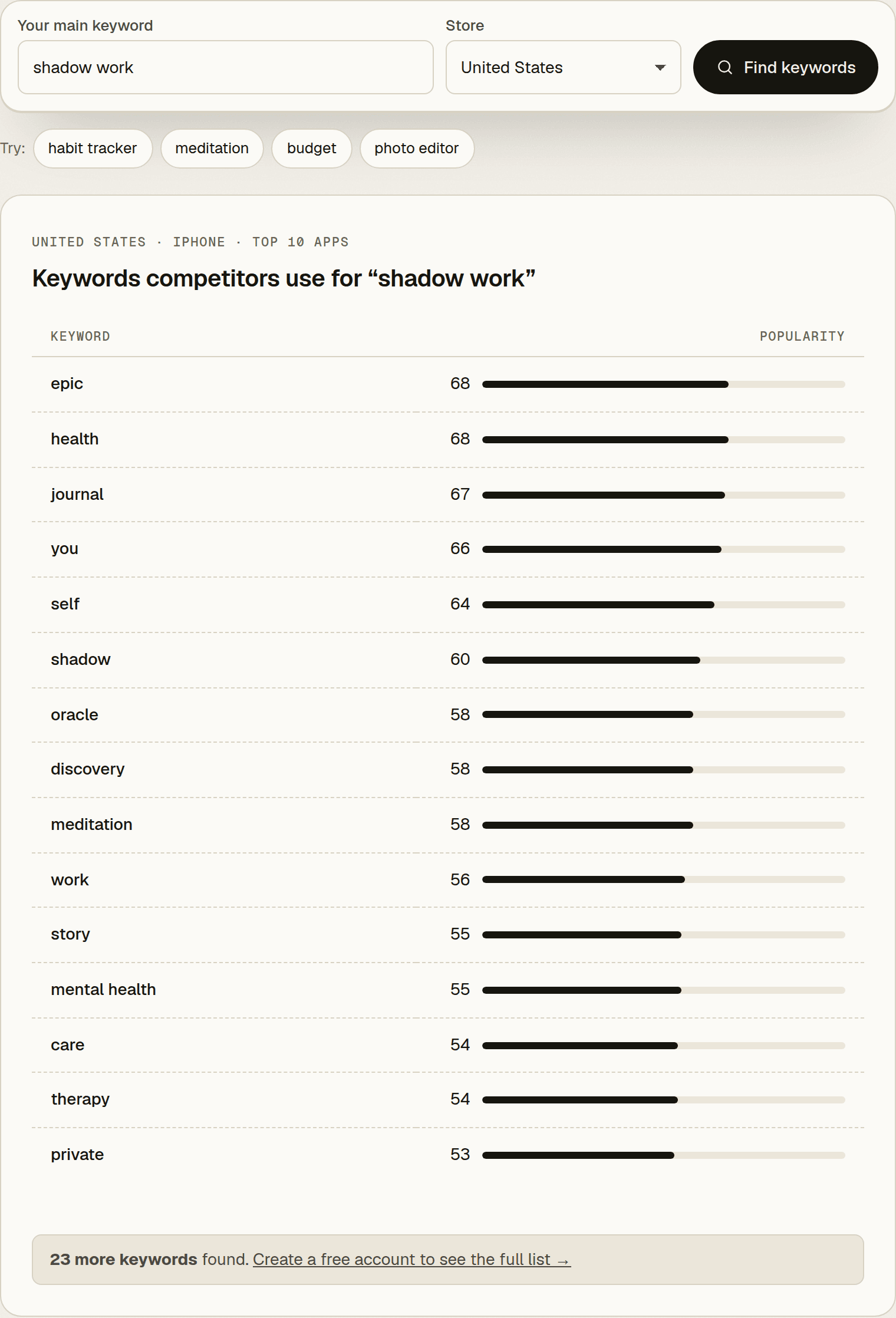
That list needs filtering, and that's normal:
- "epic", "you", "story" come from other apps' names. They don't describe my app.
- "oracle" is another app's theme.
- "therapy" and "mental health" would imply something the app doesn't offer. It's a reflection journal, not mental health care, so those stay out.
- "discovery" and "private" fit. The app is private by design, and "self discovery" is a seed already.
The most searched keywords in your category are a third source when you're stuck for ideas.
Step 3: Check popularity and difficulty
Run your best candidates through the keyword popularity checker and write down two numbers. Popularity (5 to 100) shows how often a term is searched compared to others in the same store. Difficulty (0 to 100, lower is easier) shows how hard it is to rank. If you're not sure how to read the scores, the guide to App Store keyword popularity explains what each range means and which one to target. One thing to remember: a 5 is a floor, not zero.
Plan your checks. The free tools share 10 checks a day (iPhone results), so start with your 10 most promising phrases. A free account adds 25 research calls a month.
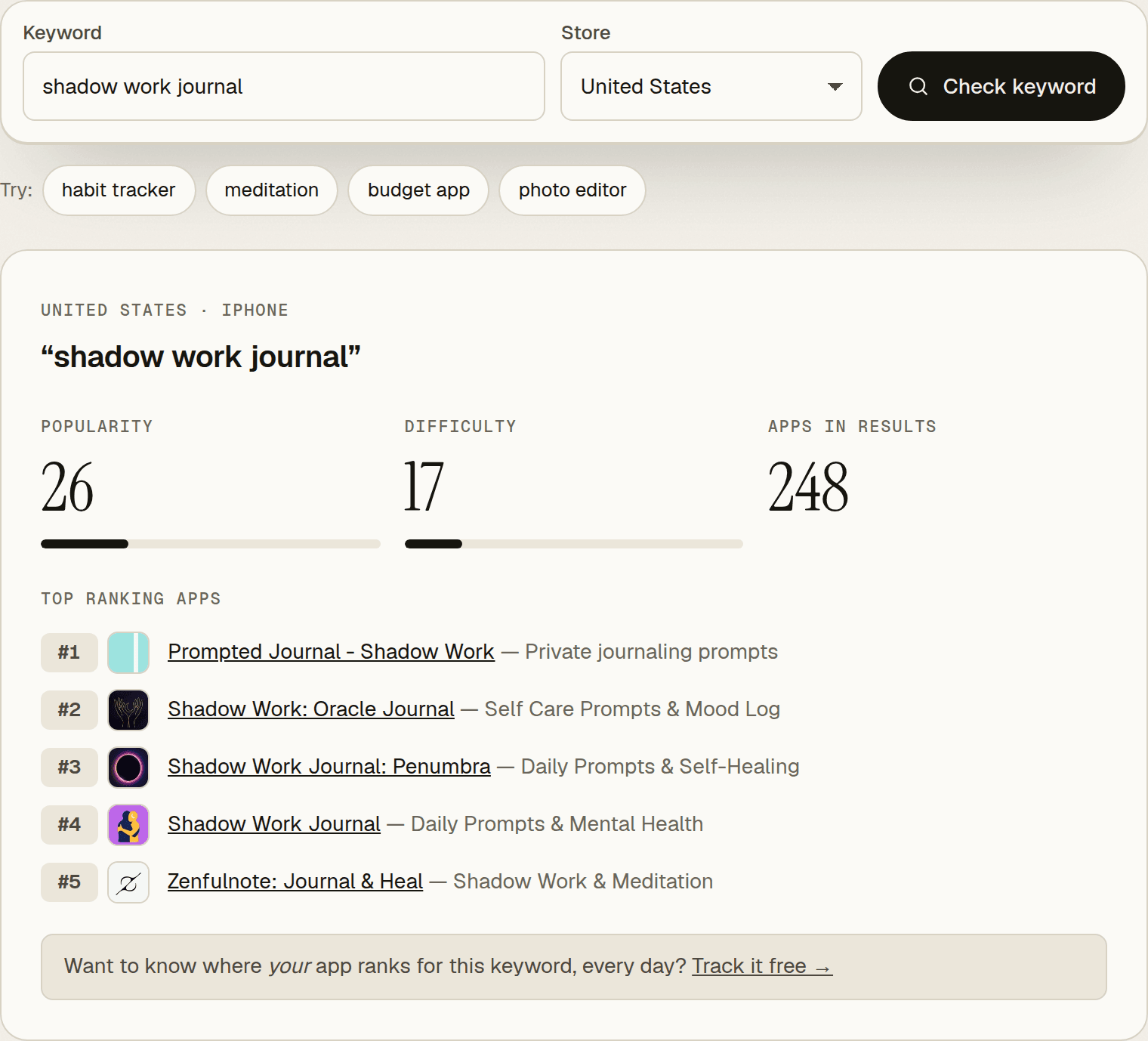
Here is what my shortlist looked like:
| Keyword | Popularity | Difficulty | First read |
|---|---|---|---|
| shadow work | 32 | 19 | Keep. Core term, already in the name. |
| shadow work journal | 26 | 17 | Keep. Already in the name. |
| writing prompts | 34 | 21 | Looks great. Check who ranks. |
| spiritual awakening | 20 | 13 | Looks great. Check who ranks. |
| voice journal | 40 | 41 | Keep. Matches a real feature. |
| personal growth | 19 | 21 | Keep. |
| journal prompts | 20 | 48 | Maybe. |
| mood journal | 33 | 56 | Maybe. Crowded. |
| inner child | 5 | 7 | Keep. Low score, but very easy. |
| self discovery | 5 | 21 | Keep. |
| guided journal | 5 | 55 | Drop. Low demand and hard. |
| mindfulness | 47 | 73 | Drop. Too hard for a new app. |
Step 4: Look at who ranks
Scores don't tell you whether searchers want an app like yours. The results do. Search each keyword in the App Store, or look at the top apps the checker shows, and ask two questions. Do these apps solve the same problem as mine? How many ratings does the #1 app have?
If your app is live, check its current position with the rank checker.
| Keyword | #1 app | #1 app US ratings | My rank | Decision |
|---|---|---|---|---|
| shadow work prompts | Soul Arc: Shadow Work Journal | 9 | 6 | Keep |
| shadow work journal | Prompted Journal - Shadow Work | 6,907 | 18 | Keep |
| shadow work | Shadow Work - Mindberg | 369 | 24 | Keep |
| personal growth | YOU2.0: Personal Growth | 0 | not ranking | Add |
| inner child | Inner Child Care | 1 | not ranking | Add |
| writing prompts | Daily Prompt: Writing Prompts | 2,369 | not ranking | Drop |
| spiritual awakening | Mind: Spiritual Awakening | 257 | not ranking | Drop |
| voice journal | Untold - Voice Journal | 2,262 | not ranking | Keep |
| mood journal | My Daily Diary - Mood Journal | 11,390 | not ranking | Keep as a long shot |
The two "looks great" keywords from Step 3 failed this step:
- "writing prompts" is a creative writing search. The #1 app's subtitle is "Creative story & poetry ideas". People looking for story ideas won't download a reflection journal.
- "spiritual awakening" returns apps about telepathy, ESP and meditation. Low difficulty doesn't help when the searcher wants something else.
The table also shows something the scores can't: my app has "Shadow Work" and "Journal" in its name and still ranks 18th and 24th for those terms. Matching text gets you into the results. Apple also weighs downloads and ratings, and with no US ratings yet, my app has little of either.
Step 5: Place keywords in your name, subtitle and keyword field
Put your most important phrase in the name, the next in the subtitle, and single words in the keyword field. Words from different fields can match one search together, so you don't need to repeat whole phrases. A match isn't a good rank, though. "voice" is already in my keyword field and "Journal" is in my name, and the app still isn't among the roughly 250 results for "voice journal".
Apple's rules for the keyword field (Apple: App Store search):
- 100 characters total, separated by commas with no spaces. Spaces inside a phrase are fine.
- Don't repeat words that are already in your name, subtitle or category.
- Skip plurals of words you already use, generic terms like "app", and filler like "the".
- No competitor app names, trademarks or irrelevant terms. Improper keywords are a common reason for rejection.
My name (Shadow Work Prompts & Journal, 29 characters) and subtitle (Self-Care & Daily Reflection, 28 characters) already cover the core terms, so I'd leave them alone. The keyword field is where the research changes things.
Before (11 words, 92 of 100 bytes):
guided,discovery,emotional,growth,archetype,mood,voice,writing,patterns,feelings,mindfulnessAfter (12 words, 88 of 100 bytes):
voice,mood,discovery,personal,growth,inner,child,emotions,private,feelings,diary,trackerWhat changed and why:
- Removed "guided", "writing", "mindfulness". They were aimed at "guided journal" (5, difficulty 55), "writing prompts" (wrong intent) and "mindfulness" (difficulty 73). None had a realistic payoff.
- Removed "archetype", "patterns". Both read low on their own (5 and 10) and don't form a searched phrase with the other words.
- Swapped "emotional" for "emotions". Same idea, but "emotions" scores 17 and "emotional" scores 5.
- Added "personal". With "growth" it targets "personal growth" (19, difficulty 21, #1 app has no ratings).
- Added "inner,child". "inner child" reads 5, but difficulty is 7 and the #1 app has one rating. Another shadow work app ranks 6th for "shadow work journal" with "Inner Child" in its subtitle, so the audience overlaps.
- Added "private". With "Journal" from the name it targets "private journal" (31). It's hard (difficulty 48), but it describes the app exactly: entries stay on the device.
- Added "diary" and "tracker". "diary" is a synonym people use for journal, and "tracker" with "mood" targets "mood tracker". Both are long shots (difficulty 66 and 65), so I'd watch them, not count on them.
- Kept "voice", "mood", "discovery", "growth", "feelings". Each targets a phrase with demand ("voice journal", "mood journal", "self discovery", "personal growth") or has a measured score on its own ("feelings" reads 21).
Check the result in the metadata checker. It counts the keyword field in bytes, which matters for languages where one character takes several bytes, and flags words that repeat your name or subtitle.
Each storefront has its own metadata. If you localize, research each store in its own language. The localizations table shows which languages each storefront accepts.
Step 6: Measure and swap
Once the new keywords are live, check where you rank and replace the ones that don't move.
- Check positions weekly with the rank checker, or track them daily so you see the trend instead of one snapshot.
- In App Store Connect, App Analytics lets you filter impressions, conversion rate and downloads by source, including App Store search (Apple). Read it next to your rank data to see whether the new keywords bring in more search traffic.
- Give each change a few weeks. If a keyword isn't in the top 10 by then, swap it for the next candidate from your Step 4 list.
- Keyword field changes go live with a new app version, so batch them with a release.
A simple research worksheet
Keep one row per candidate. It takes a minute per keyword and makes the next round much faster.
| Keyword | Source | Popularity | Difficulty | #1 app ratings | My rank | Keep? |
|---|---|---|---|---|---|---|
| personal growth | autocomplete | 19 | 21 | 0 | not ranking | yes |
| writing prompts | seed | 34 | 21 | 2,369 | not ranking | no, wrong intent |
Common mistakes
- Spending bytes on spaces, plurals and repeats. "journal" is already in my name, so "journal" or "journals" in the keyword field adds nothing.
- Choosing by score alone. Two of my best-scoring candidates ("writing prompts", "spiritual awakening") had the wrong searchers behind them.
- Describing the app you wish you had. If a keyword implies a feature or a claim you can't back up, leave it out.
- Researching once. Scores shift and new apps arrive. Recheck your list before each metadata update.
Next step
Take your top 10 candidates and run them through the keyword popularity checker. It's free and needs no sign-up. Keep the phrases with real demand and difficulty you can beat, check who ranks for them, and rebuild your keyword field from what's left.
Frequently asked questions
Can you do App Store keyword research without paid tools?
Yes. App Store autocomplete gives you real phrasing, and free tools give you popularity, difficulty and current ranks. The limit is volume: free checkers cap how many keywords you can look up per day, so you have to prioritize.
How many keywords should I target?
Around 10 to 15 words in the keyword field, plus the terms in your name and subtitle. Focus on 5 to 10 phrases you can realistically reach the top 10 for, rather than many you'll rank 80th for.
How often should I change my keywords?
Review them every few weeks and change them with your next app update. The keyword field can only be edited when you submit a new version.
Do keywords in the description help App Store ranking?
Apple lists the app name, subtitle, keyword field and primary category as the text it uses for search. Apple also says promotional text doesn't affect ranking. Write the description for people deciding whether to download.
Picked your keywords?
Track them daily.
Free plan · no card required · MCP included