How to check your App Store keyword rankings
Updated
TL;DR: App Store Connect has no keyword ranking report. To see where your app ranks for one keyword, run a neutral check in the store and on the device you care about. To see whether a change worked, track your 5 to 10 most important keywords every day. Searching on your own phone is fine for a rough look, but it isn't a measurement.
Your App Store keyword ranking is your app's position in the search results for one keyword, in one storefront, on one device type. The App Store returns a limited list for each search: for the keywords below, between 184 and 248 apps. If your app isn't in that list, it has no rank for that keyword yet. The quickest way to see your number is to check where your app ranks for a keyword for free, without signing up.
I'll show each method on one of my own apps, Shadow Work Prompts & Journal. It's a small journaling app with no US ratings yet. All numbers are from the US App Store. The daily history runs from October 22 to October 30, 2026, and the live checks are from October 30.
| Method | What it shows | Cost | Good for |
|---|---|---|---|
| Search the App Store yourself | Roughly where you appear for you, on your device | Free | A quick look at one keyword where you expect a top 5 rank |
| App Store Connect Analytics | Search impressions and downloads in total, with no rank and no keywords | Free | Checking whether search traffic as a whole goes up |
| Free rank checker | Your exact rank for one keyword, in any storefront, on iPhone | Free, 10 checks a day | Spot checks before and after an update |
| Daily rank tracking | Rank history for a list of keywords, per store and device | Free for 10 keywords | Telling whether a metadata change worked |
Option 1: Search the App Store yourself
Search the keyword on your iPhone and count down to your app. It works, but treat the number as rough.
- Open the App Store and type the exact keyword.
- Skip the ad at the top if there is one. It's marked as an ad and isn't part of the organic ranking.
- Scroll and count until you reach your app.
Why your own phone is a rough guide:
- You see one storefront. The App Store you get is tied to your Apple Account's country or region, and switching it is a whole process (Apple Support). A US account won't show you UK results.
- You see one device type. iPhone and iPad have separate results. For one of my keywords the gap is 1st vs 7th (see below).
- Results can look different if you already have the app. Apple says people who downloaded an app before can see its event card in search results, while new users see screenshots (Apple: App Store search). Your results page isn't necessarily the one a new user gets.
- Counting is slow. My app sits 34th for "shadow work". Counting 34 results by hand every day isn't a real process.
Use it when you expect to be in the top 5 and just want to see your listing the way a searcher does.
What App Store Connect shows (and what it doesn't)
App Store Connect tells you how much traffic comes from search. It doesn't tell you which keywords bring it or where you rank.
In App Store Connect, open your app, then Analytics > Acquisition > Sources. You can pick a metric (impressions, product page views, downloads, conversion rate) and see it by source type, including App Store Search (Apple: Acquisition).
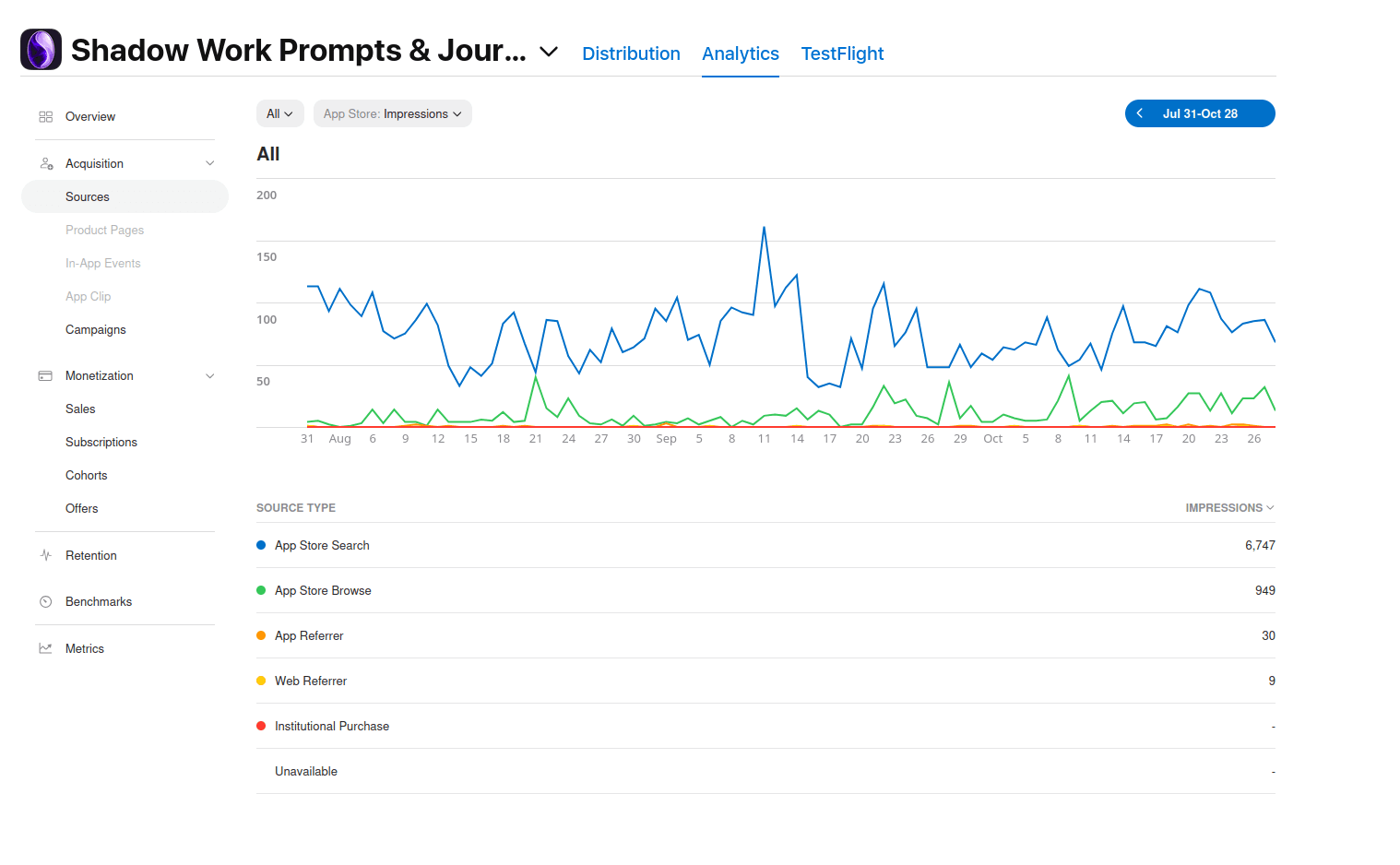
My app had 6,747 impressions from App Store Search between July 31 and October 28. That's one line and one total. Nothing says which searches they came from or where the app ranked for any of them.
Two things to know when you read it:
- Apple counts views and downloads from ads in search results as App Store Search too. If you run Apple Ads, part of that line is paid.
- Apple Ads has a search terms report, but only for searches your campaigns paid for. It doesn't cover organic search.
App Store Connect is still useful. Read it next to your rank data: if your ranks rise and App Store Search downloads rise in the same weeks, the change is working.
Option 2: Check one keyword with a free rank checker
Paste your App Store link, type the keyword, pick the store, and you get your exact rank in a neutral iPhone search.
- Open the App Store rank checker.
- Paste your App Store link or app ID. The ID is the number after "id" in the link.
- Type the keyword and choose the storefront.
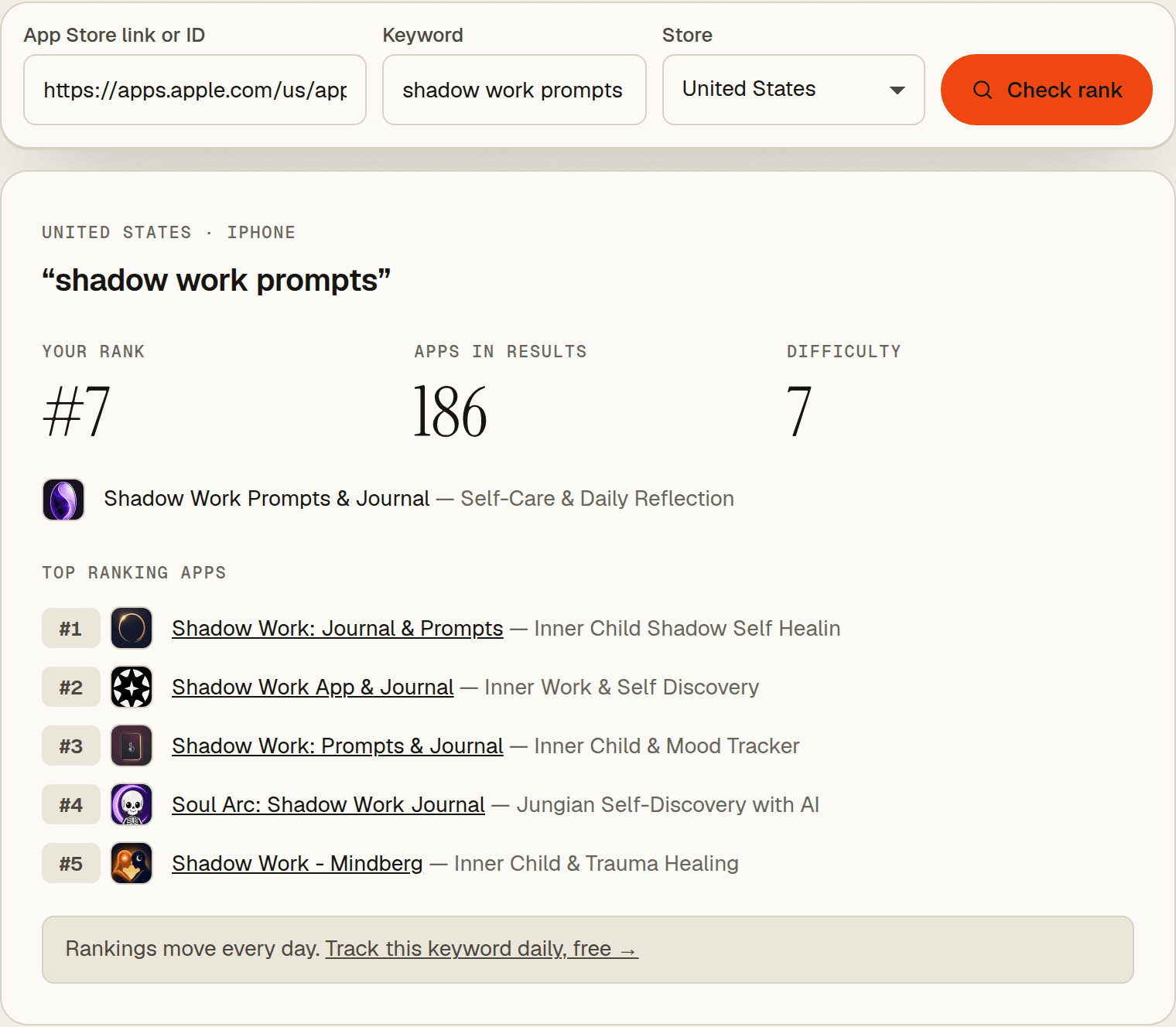
You get four things: your rank, how many apps the search returned, a difficulty score from 0 to 100, and the five apps at the top. The top apps are the useful part. They show what you're competing with, and how many ratings it takes to sit there.
Here's my app on October 30, US, iPhone:
| Keyword | My rank | Apps in results |
|---|---|---|
| shadow work prompts | 7 | 186 |
| shadow work journal | 20 | 248 |
| shadow work | 34 | 247 |
| shadow work app | 38 | 248 |
| voice journal | not in results | 247 |
"voice journal" is the useful row. "Journal" is in my app name and "voice" is in my keyword field, and the app still isn't among the 247 results. Having the words isn't enough to show up.
The checker is free, but the free tools share 10 checks a day and show iPhone results only. That's enough for spot checks. It isn't enough to follow a list of keywords over weeks.
Option 3: Track your keywords every day
Ranks move every day, even when you change nothing. You need a daily history before you can say whether an update helped.
I track three keywords for my app. This is iPhone, US, measured once a day. I didn't change the app's metadata during this period:
| Date (Oct 2026) | shadow work | shadow work app | shadow work prompts |
|---|---|---|---|
| 22 | 15 | 17 | 4 |
| 23 | 19 | 19 | 5 |
| 24 | 19 | 20 | 5 |
| 25 | 15 | 19 | 5 |
| 26 | 22 | 65 | 7 |
| 27 | 26 | 66 | 7 |
| 28 | 27 | 37 | 6 |
| 29 | 25 | 38 | 5 |
| 30 | 34 | 38 | 7 |
Three different patterns, with the same metadata:
- "shadow work prompts" moves between 4 and 7. That's normal day-to-day noise.
- "shadow work app" jumped from 19 to 65 in a day, then came back to 37. If I had checked once on the 26th, I'd have thought something broke.
- "shadow work" slid from 15 to 34 over nine days. That's a trend, not noise, and only a daily series shows the difference. I haven't changed anything, so the cause is on the other side: other apps' updates, ratings and downloads move you too.
To set it up:
- Create a free account. No credit card.
- Add your app by its App Store link or ID and pick the store and device.
- Add up to 10 keywords. Each one is measured right away and then every 24 hours.
The free plan keeps 7 days of history, which covers a week-over-week comparison. My account is on Pro, which is why the table above goes back nine days. Pro keeps the full history, which you want for judging a change over a month. See the keyword rank tracker for what's tracked.
Why your rank differs by country and device
Every storefront and every device type has its own search results. One app can rank very differently for the same keyword.
Same app, same keyword, same store, checked within the same minute on October 30:
| Keyword | iPhone | iPad |
|---|---|---|
| shadow work prompts | 7 | 1 |
| shadow work journal | 20 | 11 |
| shadow work app | 38 | 20 |
| shadow work | 34 | 28 |
| voice journal | not in results | not in results |
On iPad my app is the top result for "shadow work prompts". On iPhone it's 7th. If I only checked iPhone, I'd never know I own that search on iPad.
A few rules that follow from this:
- Check the devices you ship on. My app has no Mac version, so it doesn't appear in any Mac search. That's expected, not a ranking problem. If you do ship on Mac, the Mac App Store has its own results and needs its own checks.
- Check each storefront separately. Each store has its own results and its own metadata, so the US and UK stores can rank you differently for the same English keyword.
- Compare like with like. A rank from your iPad today vs a rank from a checker's iPhone search last week isn't a trend.
How to read your numbers
What matters is the band you're in and the direction you're moving, not one day's number.
- 1 to 10: people see you without much scrolling. This is the range worth fighting for.
- 11 to 50: the App Store matches you, but stronger apps sit above you. Worth tracking, and worth working on if the keyword is important.
- Below 50: you're in the results, but few people will scroll that far.
- Not in results: the App Store isn't matching you for that phrase, or stronger apps fill the list. Check that the words are in your name, subtitle or keyword field. Step 5 of the keyword research guide covers where to put them, and the metadata checker flags wasted space.
These bands are my working rule, not something Apple publishes. Judge a keyword on its weekly trend. A move from 7 to 5 on one day means nothing. A move from 15 to 34 over a week means something.
A simple tracking routine
- Pick 5 to 10 keywords for each store and device that matter to you.
- Write down the date every time you ship new metadata.
- Look at the trend once a week. Don't react to single days.
- Two to four weeks after a change, compare against the dates you noted. Keep the keywords that moved up and swap out the ones that didn't.
Next step
Check where your app ranks for your most important keyword now. It takes ten seconds. If the number surprises you, start tracking it daily so the next one doesn't.
Frequently asked questions
Does App Store Connect show keyword rankings?
No. Analytics shows impressions, product page views and downloads by source, including App Store Search, but there's no rank and no list of search terms. You need a separate tool to see the rank for a keyword.
How long after a metadata update do rankings change?
New keywords can only count once the new version is live, and the keyword field can only be changed with a new version. After release, give it two to four weeks of daily data before deciding whether a keyword worked. A single day's jump in either direction isn't a result.
Do Apple Ads count in my rank?
Not in Dekadans. The rank counts organic search results only, so an ad placement at the top doesn't change it. App Store Connect is different: its App Store Search source includes views and downloads from search ads.
How many keywords should I track?
Start with 5 to 10 per store and device: your main phrases plus a few you're trying to move into the top 10. The free plan tracks 10 keywords. Add more only when you'd actually act on what they show.
One check is a snapshot.
Track it daily.
Free plan · no card required · MCP included