ASO with Claude Code: keyword research with live App Store data
Updated
TL;DR: One command connects Claude Code to live App Store keyword data through the Dekadans MCP server. After that, you can ask it in plain English to find keyword candidates, score their popularity and difficulty, check where your app ranks, and draft your 100-character keyword field. The full session below used 11 research calls, which fits in the free plan's 25 a month.
Claude Code doesn't have App Store popularity scores or today's rankings. Ask it about keywords out of the box and it can only guess from training data or whatever it finds on the web. Give it a data source through an MCP server and it can look up live numbers, then do the part it's good at: sorting, cutting and fitting words into 100 bytes.
Below is a real session I ran on October 27, 2026, on one of my own apps, Shadow Work Prompts & Journal. It's the same app I used in the manual keyword research guide, so you can compare the two workflows. All numbers are from the US App Store on iPhone. I've trimmed Claude's answers but haven't changed any numbers.
The steps:
- Get an API key
- Add the server to Claude Code
- Find keyword candidates
- Score popularity and difficulty
- Check who ranks and where you rank
- Draft the keyword field
- Track the winners (optional)
Step 1: Get an API key
Create a key in the dashboard under Plan & API keys. Keys start with aso_. If you don't have an account, create a free one. No credit card needed, and the MCP server is included on the free plan.
Step 2: Add the server to Claude Code
Run this in your terminal, with your key in place of aso_your_key:
claude mcp add --transport http dekadans https://dekadans.net/mcp \
  --header "Authorization: Bearer aso_your_key"
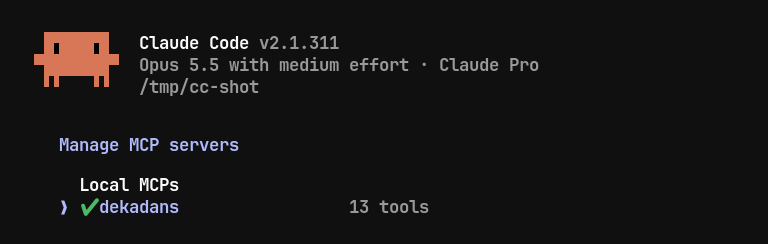
Then start claude and type /mcp. You should see dekadans connected with 13 tools.
Two things to know about the key:
claude mcp addsaves the server withlocalscope by default: only you, only in the current project. Theprojectscope writes it to a.mcp.jsonfile in your repo that's meant to be committed and shared with your team, so don't put your key there. See Claude Code's MCP docs for the other options.- The key can add apps and keywords to your account, not only read data. Delete it in the dashboard to cut off access right away.
Using Codex or Cursor? The MCP server page has their configs.
Step 3: Find keyword candidates
Ask for keyword ideas for your app, and for the words competitors use for your main phrase.
My prompt:
My app is Shadow Work Prompts & Journal (App Store ID 6759388839), US store, iPhone. Use the dekadans tools to find keyword candidates: get keyword suggestions for the app, and competitor keywords for the seed "shadow work journal". Then give me a shortlist of 15-20 candidates that fit what the app does. Leave out therapy or mental-health treatment terms.
Claude called two tools:
get_keyword_suggestionsreturned 6 ideas for the app. Two were noise (a Russian and a Chinese term). The useful ones came with scores: "shadow work" (popularity 32, difficulty 19) and "shadow work journal" (26, 17).get_competitor_keywordsread the top 10 apps for "shadow work journal", checked 111 candidate terms and returned the ones with popularity above 5.
It came back with a 20-item shortlist and a list of what it left out and why: "mental health" and "healing" (my rule), "fitness" and "weight loss" (other apps in the results, not my audience), and the two foreign-language terms. It also pointed out three phrases that fit the app but didn't appear in either result ("inner child", "shadow work prompts", "self reflection") and offered to check them. That's what I want from an assistant here: say which numbers it has and which it doesn't.
Step 4: Score popularity and difficulty
Check your phrases in one batch, not one at a time. get_keyword_popularity takes up to 100 keywords in a single call, and a single call uses one research call from your quota.
I asked Claude to score 14 phrases in one call and give each a verdict:
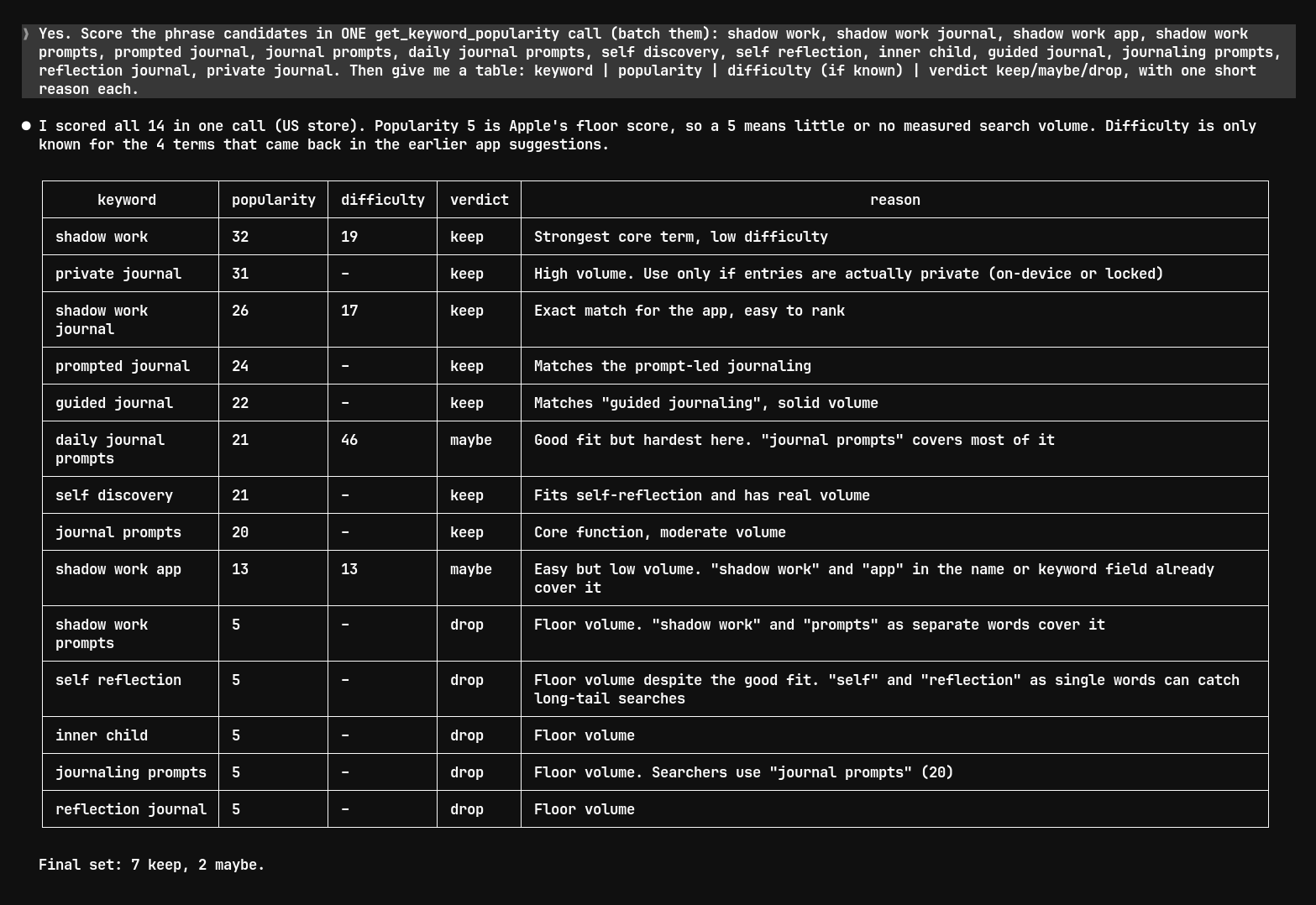
The short version:
| Keyword | Popularity | Difficulty | Claude's verdict |
|---|---|---|---|
| shadow work | 32 | 19 | keep |
| private journal | 31 | n/a | keep |
| shadow work journal | 26 | 17 | keep |
| prompted journal | 24 | n/a | keep |
| guided journal | 22 | n/a | keep |
| daily journal prompts | 21 | 46 | maybe |
| shadow work app | 13 | 13 | maybe |
| shadow work prompts | 5 | n/a | drop |
| self reflection | 5 | n/a | drop |
| inner child | 5 | n/a | drop |
The table was useful. Two of the explanations weren't right:
- "A 5 means little or no measured search volume." Not quite. 5 is the floor of the scale, and it covers every term below what Apple reports, so it isn't a volume number. The keyword popularity guide explains what the scores mean and which range to aim for.
- "'shadow work' and 'app' in the name or keyword field already cover it." Apple's guidance is to leave generic words like "app" out of the keyword field (Apple: App Store search). I didn't add it.
Difficulty only shows for some terms here because the popularity tool doesn't measure it. The App Store search in the next step does.
Step 5: Check who ranks and where you rank
For each phrase you want to keep, look at the top apps and your own position. search_app_store runs a live App Store search and, with your App Store ID, tells you where your app is.
My prompt:
For these 5 keepers, run search_app_store with my app ID to see the top apps and where my app ranks now: shadow work, shadow work journal, guided journal, prompted journal, private journal. For each: my position (or not in results), difficulty, and whether the top 5 apps solve the same problem as mine. Cut any keyword where the top apps are a different kind of app.
Claude ran the five searches. Each returned 50 apps:
| Keyword | My position | Difficulty | Top 5 apps | Verdict |
|---|---|---|---|---|
| shadow work journal | #17 | 17 | All 5 are shadow work journals | keep, best chance at the top 10 |
| shadow work | #26 | 19 | 4 of 5 are shadow work journals | keep |
| prompted journal | not in the top 50 | 39 | Prompt-based journals; #1 is an app named "Prompted Journal - Shadow Work" | keep, with caution |
| guided journal | not in the top 50 | 55 | Mixed; two of them have 36,000 and 45,000 ratings | keep, low priority |
| private journal | not in the top 50 | 48 | Locked diary apps (Day One, Apple's Journal, Diary With Password) | cut |
"Not in the top 50" means my app wasn't in the results that came back, not that it's missing from the store.
The cut was the most useful part. "private journal" had the highest popularity on my list (31), and the app does keep entries on the device. But people searching it want a locked diary, and the top apps all are one. My manual research the day before kept "private" in the keyword field. This time I agree with Claude and leave it out.
Claude also caught that "prompted journal" is mostly the name of one competitor app (6,907 ratings). A lot of that search volume is probably people looking for that app.
Step 6: Draft the keyword field
Give Claude your exact name, subtitle and current keyword field, plus Apple's rules, and ask for a new field with a byte count.
I gave it the current field and the rules (100 bytes, commas with no spaces, no words repeated from the name or subtitle, no plurals, no category names, no competitor names) and asked it to look up my name and subtitle itself.
That last part didn't work. get_app_details returns the app name but not the subtitle, and Claude said so:
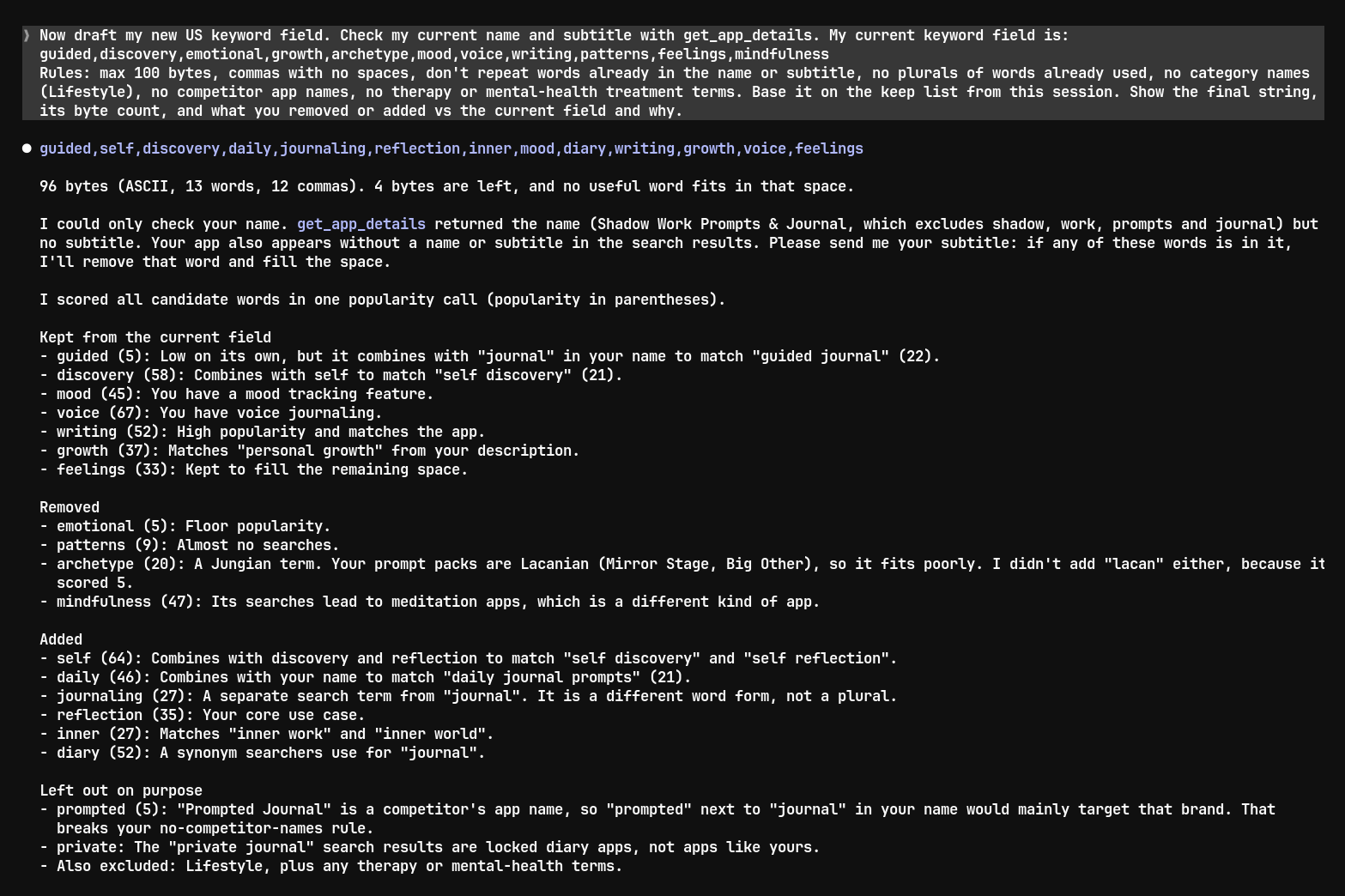
Its first draft was 96 bytes, and it included "self", "daily" and "reflection". All three are already in my subtitle (Self-Care & Daily Reflection), so they would have wasted 22 bytes. Claude had flagged that it couldn't check, which is the right behavior, but if I had pasted the string without reading, I'd have shipped the mistake. Give it your exact current metadata up front.
After I sent the subtitle, it removed the three words, scored 10 new single words in one more popularity call and filled the space:
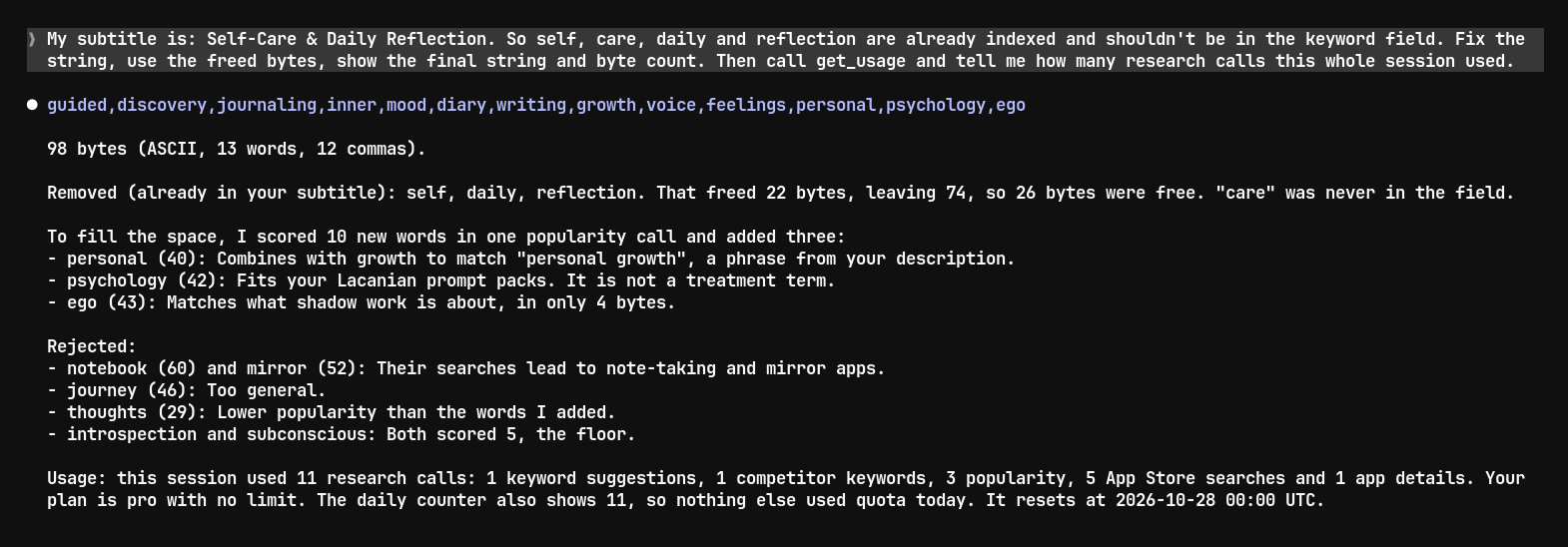
Before (11 words, 92 of 100 bytes):
guided,After (13 words, 98 of 100 bytes):
guided,What changed:
- Removed "emotional" (5) and "patterns" (9) for low scores, "archetype" (20) because, as Claude pointed out from my description, my prompt packs draw on Lacan, not Jung, and "mindfulness" (47) because the results are meditation apps.
- Added "journaling" (27), "inner" (27), "diary" (52), "personal" (40, for "personal growth"), "psychology" (42) and "ego" (43).
- Rejected "notebook" (60) and "mirror" (52): high scores, but the results are note-taking and mirror apps.
One thing I overruled: Claude kept "voice" (67). That number is for the single word, and most people searching "voice" probably want a voice recorder. When I checked the day before, my app wasn't in the results for "voice journal" either. I keep it anyway because voice journaling is a real feature, but I'll watch it.
Count the bytes yourself in the metadata checker. Claude counted correctly this time, but models can miscount, and the checker also flags words that repeat your name or subtitle. Apple's full keyword field rules are in Step 5 of the manual guide.
This is a proposal, not a shipped change. The manual run of the same research came to a different field with 8 words in common, so treat Claude's version as a draft for you to review.
Step 7: Track the winners (optional)
Put the phrases you chose on daily tracking, so you can ask about them later. add_keywords adds them to your app and measures rank, popularity and difficulty right away. After that they refresh automatically every day.
A week later you can ask "which of my keywords moved this week?" and Claude reads the history with get_app_keywords and get_keyword_history. The free plan tracks 10 keywords with 7 days of history. See the rank tracker for the dashboard view of the same data.
I didn't run this step in the session above. It changes what's tracked in my account, so I kept the session read-only.
What it costs on the free plan
Each call to a research tool uses one research call, however many keywords it contains. The research tools are search_app_store, get_keyword_popularity, get_keyword_suggestions, get_competitor_keywords, get_most_searched_keywords and get_app_details. The free plan includes 25 research calls a month. Tracking tools like add_keywords and get_app_keywords don't use research calls, but the free plan tracks at most 10 keywords.
This session used 11 research calls:
| Tool | Calls |
|---|---|
search_app_store | 5 |
get_keyword_popularity | 3 |
get_keyword_suggestions | 1 |
get_competitor_keywords | 1 |
get_app_details | 1 |
That leaves 14 calls for the rest of the month. To make them last, ask Claude to batch: one popularity call with 14 phrases cost the same as one with a single phrase. get_usage shows how many calls you have left this month.
If you need more, Pro has unlimited research calls under fair use. See pricing.
Where ASO skills get their numbers
There are plenty of ASO skills for Claude Code on GitHub, and the main difference between them is where their data comes from. A few examples, from their READMEs as of October 27, 2026:
- appeeky/aso-skills pulls App Store data from the Appeeky API.
- claude-code-aso-skill uses Apple's iTunes Search API for competitor metadata and ratings.
- claude-aso-audit-skill audits your metadata and live listings, and adds live keyword data through optional paid extensions.
A skill is a set of instructions. If it has no data source behind it, its keyword numbers come from the model's training data. Before you install one, check the README for where popularity and rank numbers come from.
Skills and MCP servers also work together: the skill gives Claude a checklist, and the server gives it the data. You don't need a skill for the workflow in this post.
Prompts to copy
These are the prompts from the session, cleaned up. Replace the app details with yours.
My app is <name> (App Store ID <id>), US store, iPhone. Get keyword suggestions for the app and competitor keywords for "<main phrase>". Give me a shortlist of 15-20 candidates that fit what the app does.

Score these in ONE get_keyword_popularity call: <phrases>. Table: keyword | popularity | difficulty | keep/maybe/drop, one short reason each.

For these keepers, run search_app_store with my app ID: <phrases>. For each: my position, difficulty, and whether the top 5 apps solve the same problem as mine. Cut any where they don't.

My name is "<name>", my subtitle is "<subtitle>", my current keyword field is "<field>". Draft a new keyword field under 100 bytes: commas with no spaces, no words from the name or subtitle, no plurals, no category names, no competitor names. Show the byte count and what changed.

Call get_usage and tell me how many research calls I have left.Next step
Get a free API key and run the first prompt on your own app. The MCP server page lists every tool and has setup for Codex and Cursor. If you'd rather check a few keywords without an account, the keyword popularity checker works in the browser.
Frequently asked questions
Do I need a Claude Code skill as well as the MCP server?
No. The server alone is enough for the workflow above. A skill can add a checklist on top, for example screenshot or description rules, but the keyword numbers come from the server.
Can Claude Code change my App Store listing?
Not through this server. It reads App Store data and manages the apps and keywords you track in Dekadans. To change your name, subtitle or keyword field, you still submit a new version in App Store Connect.
Does this work with other AI assistants?
Yes, with any MCP client that supports Streamable HTTP and a bearer API key, such as Codex and Cursor. Clients that only support OAuth connectors aren't supported yet.
Where do the popularity scores come from?
Popularity is a relative score from 5 to 100 based on Apple Search Ads data, measured per storefront. It isn't a search count. Rank and difficulty come from a live App Store search at the time you ask.
Let your assistant
do the ASO.
Free plan · no card required · MCP included